Ergonomic chair setup guide
Updated June 2026Independently researchedNo paid placement.
To dial in your ergonomic chair in five minutes, start with seat height so your feet are flat on the floor and knees at a 90-degree angle, then adjust seat depth to leave a couple inches behind your knees, set lumbar support into the small of your back, position armrests so shoulders are relaxed and elbows at 90 degrees, and finally set tilt tension so the chair reclines with slight resistance but still supports you upright.
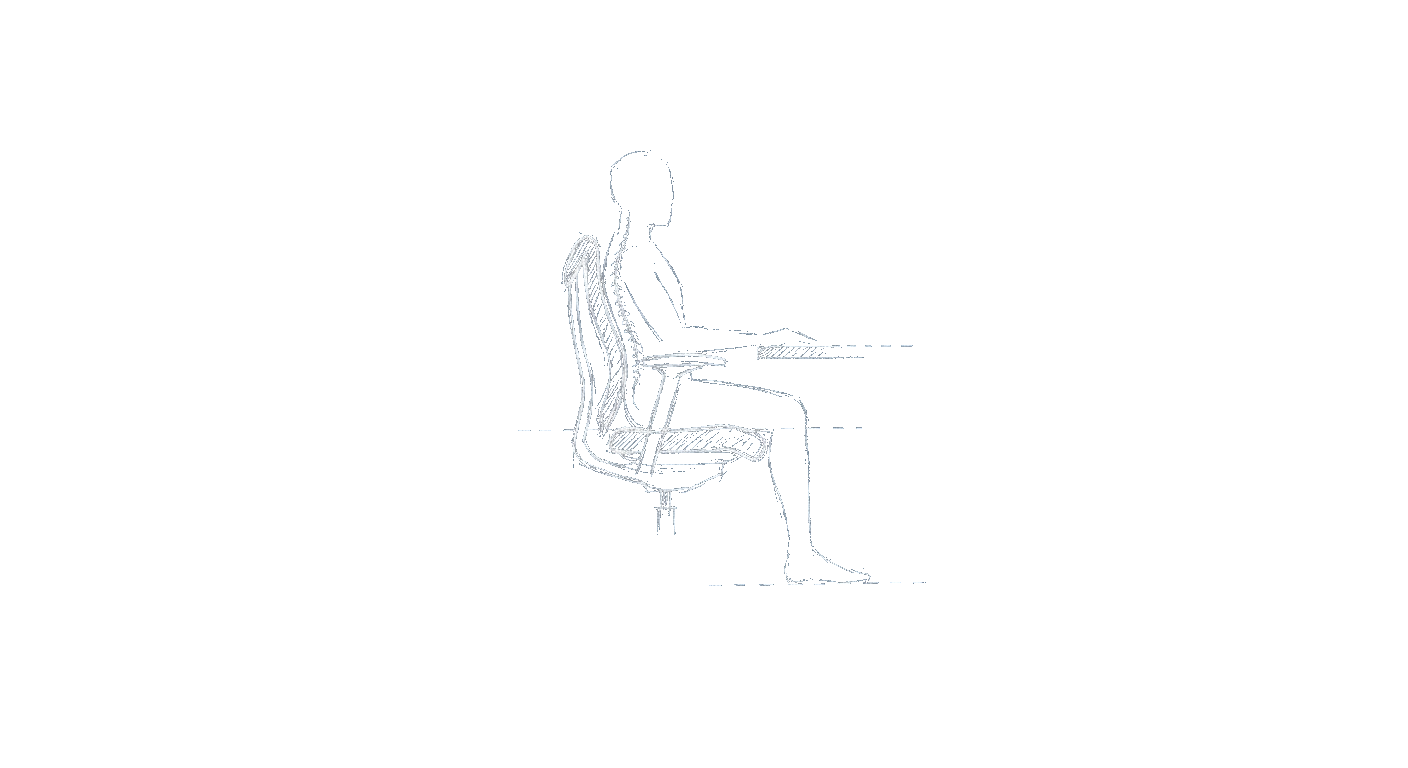
How to set your seat height for the feet-flat rule
The foundation of any good ergonomic setup is the feet-flat rule: both feet should rest firmly on the floor with your knees bent at roughly 90 degrees and your thighs parallel to the ground. This keeps your hips level with or slightly above your knees and prevents pressure behind your thighs that can cut off circulation. Most office chairs have a pneumatic lever under the seat to raise or lower the height. Sit all the way back in the chair and adjust until you feel even pressure across your thighs, no pinching behind the knees, and your feet are flat without you having to tiptoe or scooch forward. If your desk height forces you to raise the chair so high that your feet dangle, use a footrest to maintain that flat-footed position.
What is the correct seat depth for your legs?
Seat depth determines how much your thighs are supported without pressing into the back of your knees. The general rule is to leave a gap about two to three fingers’ width (roughly two to three inches) between the front edge of the seat and the back of your calves. On chairs with a sliding seat pan, push the pan forward to extend support for longer legs or slide it back for shorter legs. If your chair has a fixed-depth seat and you find the front edge digging into your calves, you can sit with a small cushion behind your back to bring you slightly forward, though this can affect lumbar alignment. The goal is to use the full seat pan without the rim hitting your knees or the backs of your legs when you lean back.
Where should lumbar support hit on your back?
Lumbar support should contact the inward curve of your lower back, roughly at the level of your belt or waistband. For most people, that’s between the bottom of the ribcage and the top of the pelvis. A well-placed lumbar support fills that natural gap, helping you sit upright without slouching. Many chairs offer height-adjustable lumbar pads or a firmness knob. Sit upright and reach behind to see if the support is pressing into the right spot; if it feels too high (poking your ribs) or too low (under your tailbone), adjust the height. Some chairs have a curve that moves with the backrest; if yours doesn’t adjust, you can use a small rolled towel or a dedicated lumbar cushion to achieve the same effect. The support should be firm enough to feel it but not so aggressive that it forces you into a strained posture.
How to adjust armrests for proper shoulder position
Armrests should allow your arms to hang naturally from your shoulders, with your elbows bent roughly 90 degrees and your forearms parallel to the floor. If armrests are too high, they’ll cause your shoulders to shrug up, leading to neck and shoulder tension; too low, and you’ll lean sideways or hunch. Adjust the height so your forearms rest lightly on the armrests while your shoulders stay relaxed. If your chair has width-adjustable armrests, bring them in close enough to support your elbows without forcing your arms to wing out. Most people benefit from armrests that are just wide enough to slide under the desk. If your chair has fixed armrests that don’t go low enough, consider removing them entirely or using a keyboard tray to maintain neutral arm angles.
How to set tilt tension and lock the recline
Tilt tension controls how much force is needed to lean back in your chair. The right setting lets you recline with a smooth, controlled motion while still returning upright without a fight. Typically there’s a knob under the seat or behind the backrest that increases or decreases spring resistance. Start by loosening the tension all the way, then sit upright and lean back slowly. Tighten the knob until you feel consistent resistance through the whole recline range, you shouldn’t fall back too easily or need to push hard to move. If your chair has a tilt lock, you can lock the backrest in an upright position when typing or doing focused work, then unlock to rock when reading or thinking. Some chairs also offer a separate tilt tension for forward tilt; ignore that unless you use a forward-leaning posture deliberately.
Frequently asked questions
Can I use a footrest if my feet don’t reach the floor?
Yes. If raising your chair to a comfortable desk height leaves your feet dangling, a footrest is the best solution. Look for one that’s wide enough to shift your feet around and angled slightly to keep your ankles at a neutral position. The goal is still to have your thighs roughly parallel to the floor.
Should my knees be exactly at 90 degrees?
90 degrees is the target, but a few degrees either way is fine. What matters more is that your feet are flat and your thighs are not pressing hard against the front edge of the seat. If your knees are significantly higher than your hips, raise the chair; if they’re lower, lower it.
What if my chair’s lumbar support doesn’t move?
Fixed lumbar shells are common on budget chairs. If the curve doesn’t hit your lower back, you can add a lumbar cushion or a rolled towel strapped to the backrest. Alternatively, some people find they can improve fit by adjusting the seat depth or using a thicker seat cushion to change their sitting position relative to the backrest.
Are armrests always necessary for ergonomic sitting?
Not always. Armrests help reduce load on your shoulders and neck, but if they force you into a bad posture (too high, too wide, or fixed in an awkward position), you’re better off without them. Many office workers remove armrests or push them out of the way and rely on a properly set desk height to support their forearms.
How tight should tilt tension feel?
Tilt tension should feel substantial enough that you can lean back without flopping, but light enough that you don’t have to consciously push to recline. A good test: lean back slowly while typing, if you bounce forward when you release pressure, it’s too loose; if you have to strain to move, it’s too tight.
Can I set up an ergonomic chair that has no armrest adjustments at all?
Yes, but you’ll need to compensate with your desk setup. Adjust your chair height so your forearms rest flat on the desk surface at elbow height, and keep your shoulders relaxed. If the fixed armrests are too high or too low, remove them entirely; your desk can act as your arm support as long as it’s at the right height.